Free 7-day trial · 30-day guarantee · no credit card

Edit video by
editing text

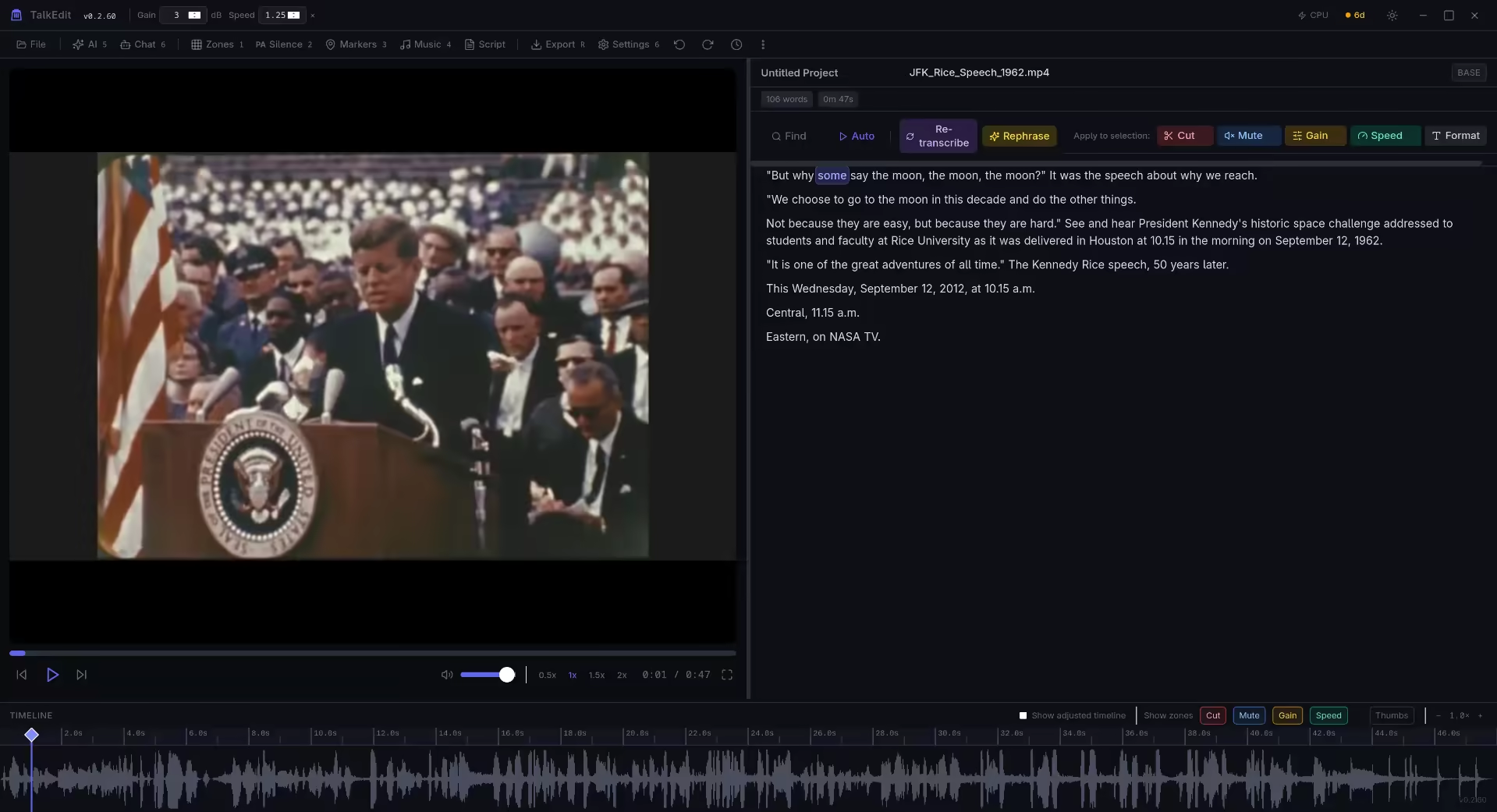
The offline video editor built for podcasters and long-form creators. Works on hour+ files without slowing down. No subscription. No data leaves your machine.

30-day money-back guarantee on all purchases

Demo video coming soon

Watch how text-based editing works in 60 seconds

Everything you need, nothing you don't

Transcription, speaker labels, AI editing, noise reduction, animated captions, and more — all offline, one-time price.

Core Editing

Text-based editing

Delete words to cut, mute, adjust gain, or change speed — all by editing text. Full keyboard shortcuts with custom remapping. 100-level undo/redo.

Handles hour+ files

No lag on 3-hour podcasts — virtualized transcript and chunked waveform. Speaker diarization labels who said what. Pause and resume transcription.

Export how you want

MP4, MOV, WebM, WAV — up to 4K. Background removal, video zoom, animated captions, chapters, background music with auto-ducking, crossfade at cuts, and plain-text transcript export. Fast stream-copy for unchanged segments.

AI & Automation

AI-powered editing

Filler removal, Smart Clean, rephrases, social clips, and show notes. Custom transcription glossary improves accuracy for domain terms. Re-transcribe with a different Whisper model anytime.

AI Chat Assistant

Chat with your transcript. Get rephrases, summaries, show notes. The assistant executes edits directly. Supports Ollama, OpenAI, Claude.

Smart Clean

One-click audio: filler removal + silence trim + noise reduction + normalize. Presets for Podcast, Interview, Social, and Presentation. Studio Sound enhancement during export for professional-grade audio.

Pro Features

Animated Captions

Burn in TikTok-style word-by-word captions with presets (TikTok, YouTube, Clean) or full manual customization. Export with video or as SRT, VTT, ASS, or plain TXT transcripts.

Text-to-Speech

Supertonic 3 — 31 languages, 44.1kHz. Generate voiceovers entirely offline. No cloud API needed.

Privacy first

100% offline. No account, no cloud, no telemetry. Auto-save crash recovery with resume on relaunch. Your data stays on your machine.

30-day money-back guarantee Stripe secure checkout 100% offline — no data leaves your machine One-time payment, own it forever

How it works

1

Import your video

MP4, MOV, MKV, WebM, M4A. Transcription starts automatically with your choice of Whisper model.

2

Edit by deleting text

Select words → cut, mute, speed up, or adjust gain. Drag zones on the waveform. 100-level undo/redo.

3

Export & publish

Choose your format, resolution, captions, and loudness target. One click to export.

Simple, transparent pricing

Start free. No credit card required. Upgrade when you're ready.

Trial

$0

7 days, core features

  • Text-based editing
  • AI transcription
  • Export with watermark-free
Download Free
Most popular

Pro

$49

One-time payment

  • Everything in Trial, forever
  • All export formats & captions
  • 30-day money-back guarantee
Buy Pro — $49

Business

$99

One-time payment

Pro users can upgrade in-app

  • Everything in Pro
  • AI editing: filler removal, Smart Clean, clip suggestions
  • Priority email support
  • Volume licensing (3+ seats)
  • Feature requests prioritized

30-day money-back guarantee

Buy Business — $99

Why TalkEdit?

Built differently than cloud editors and traditional NLEs.

TalkEdit Descript DaVinci Resolve CapCut
Price $49 one-time $24/mo Free Free / $7.99/mo
Offline 100% offline Cloud required Offline Cloud required
Hour+ files Handles easily Struggles >1hr Handles Struggles >30min
Text-based editing Native Yes No Limited
Local AI Yes (Ollama) Cloud only No Cloud only
No account required Yes Required Optional Required
Privacy No telemetry Telemetry Minimal Telemetry
Animated captions Native Manual Limited
AI chat assistant Local + Cloud Cloud only Cloud only
Smart Clean (one-click) Yes Manual
Local text-to-speech 31 languages Cloud only Cloud only
Background removal Built-in Manual
Audio crossfade Yes
Auto-updater Yes Yes Manual Yes

Get TalkEdit

Beta v0.2.21 — Linux, Windows, macOS. Free 7-day trial.

Windows macOS Linux

30-day money-back guarantee on all purchases

Linux (AppImage) • Windows (.msi) • macOS (Apple Silicon)

Frequently asked questions

Is it really 100% offline?

Yes. Transcription, AI features, and export all run locally. No data ever leaves your machine. No account required. The only time it touches the network is downloading Whisper models (optional) or if you connect to a local Ollama instance.

How long can my videos be?

TalkEdit handles hour+ files without issue. The transcript uses virtualized rendering and the waveform uses chunked loading — no lag, no crashes. We regularly test with 2-3 hour podcast recordings.

What's the refund policy?

30-day money-back guarantee, no questions asked. If TalkEdit doesn't work for you, email us and you'll get a full refund.

What formats are supported?

Input: MP4, MKV, MOV, AVI, WebM, M4A. Export: MP4 (H.264/H.265), MOV, WebM, WAV. Captions: SRT, VTT, ASS. Resolutions from 720p to 4K.

Which platforms are supported?

Windows, macOS (Apple Silicon), and Linux. Download the right build for your platform above. All three are fully supported with the same features.

Do I need a powerful GPU?

No. Transcription works on CPU (slower but usable). GPU (CUDA) speeds it up significantly. AI features use lightweight models that run on any modern machine with 8GB+ RAM.

Ready to edit?

Free 7-day trial. No credit card. No data leaves your machine.

Download TalkEdit

Stay in the loop

New features, tips, and release announcements. No spam.